Portable DVD/Blu-ray Drive for Laptops | Read & Burn
- Free Shipping On Orders $59+
- 60-Day Money-Back Guarantee
- 1O% OFF YOUR FIRSTORDER 【DH10】
Orders of $59 or more qualify for free standard shipping. Delivery availability and timing are shown at checkout, and tracking information is sent after dispatch.
Need help with a DHACTIVE order? Email support@dhactive.com for product, delivery, or order questions. Our team will help you find the right next step.
A Portable Disc Drive For The DVDs, Blu-Ray Discs, And Files You Still Need
 Reviewed by the DHactive team
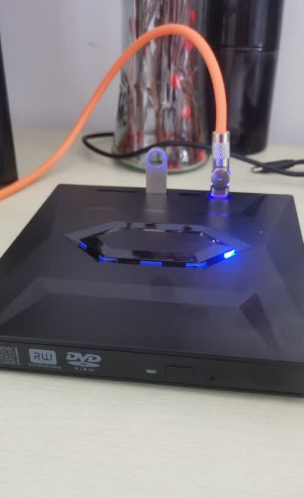
Laptops keep getting thinner, but many homes, offices, and families still have important things stored on discs. Old photo backups, software installers, music collections, home movies, movie discs, training materials, and archived work files do not stop mattering just because a new computer no longer has a built-in tray. The Portable External DVD and Blu-Ray Drive gives you a compact way to reconnect those physical discs to a compatible computer when the need comes up.
This drive is for occasional but important moments. You may not use discs every day, but when you do need one, the lack of a drive can bring the whole task to a stop. A portable external drive keeps the tool available without requiring a large desktop tower, a permanent media station, or a stack of old equipment on the desk. Store it in a drawer, laptop bag, work shelf, family tech box, or travel kit, then bring it out when a disc needs to be read or written.
The best part is the flexibility. It can support compatible DVD and Blu-ray media, help with supported burning tasks when paired with the right software and blank discs, and make older physical media feel usable again. It is especially practical for people who keep family archives, handle mixed office files, work with older software, or simply want a bridge between modern laptops and the discs still sitting in cases at home.

Useful For Computers Without Built-In Optical Drives
Many newer laptops remove the disc tray to save space and weight. That is convenient until a disc becomes the only copy of a file, a movie, a photo folder, or a software installer. This external drive gives compatible computers another way to access those discs without keeping an older machine around just for one task.
Compact Enough To Keep Nearby
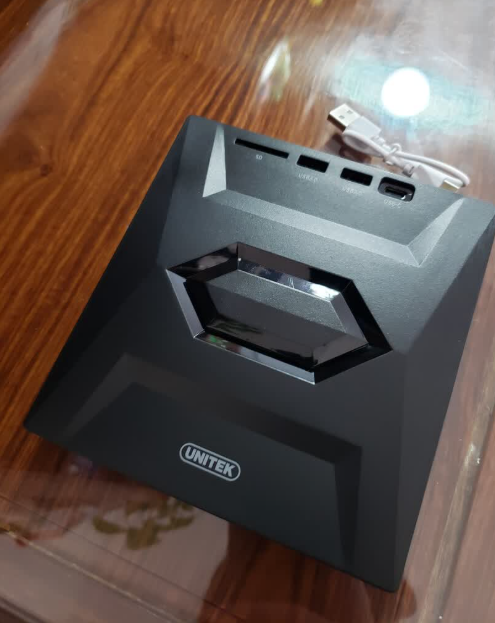
A tool is only useful if you can find it when you need it. The portable format makes the drive easier to store in practical places: a desk drawer, office cabinet, laptop sleeve, media shelf, or travel bag. It does not need to dominate the workspace, but it can be ready when a disc appears.
Clear Expectations For Disc Playback And Burning
Disc tasks depend on the computer, operating system, disc type, available power, and software. Blu-ray playback usually requires compatible playback software. Burning tasks require supported blank media and writing software. Ultra HD 4K Blu-ray playback has stricter requirements and should be checked carefully before purchase.

When It Helps Most
Use it when you want to review old family videos, open archived photo folders, install legacy software, read training materials, listen to disc-based music, load files from a work disc, or create a physical backup. It is also useful for households where several people share one tool. One portable drive can be stored centrally, then connected only when a laptop or desktop needs disc access.
For travel or work, it can be part of a small preparedness kit. Presentations, older client files, school materials, disc-based references, and family media still appear from time to time. Having a compact drive nearby can save the frustration of searching for another computer at the last minute.

Why Physical Media Still Matters
Cloud storage is convenient, but it does not erase the value of the discs already in your home. A graduation video, a backup from an older computer, a music collection, a training program, or a software disc may exist only in physical form. Even when you plan to move those files to a modern drive later, you still need a way to open the disc first. That is where a portable optical drive earns its place.
It can also help households with mixed generations of technology. One person may use a newer laptop, another may keep older media, and a family member may bring over a disc that needs to be copied, watched, or checked. A compact drive gives the household a shared bridge between old media and current computers without keeping a bulky setup on the desk.
What To Check Before Use
| Question | Why It Matters |
|---|---|
| Is the disc format supported? | Different disc types behave differently |
| Do you have playback software? | Blu-ray movies often need it |
| Is the drive on a stable surface? | Movement can interrupt reading |
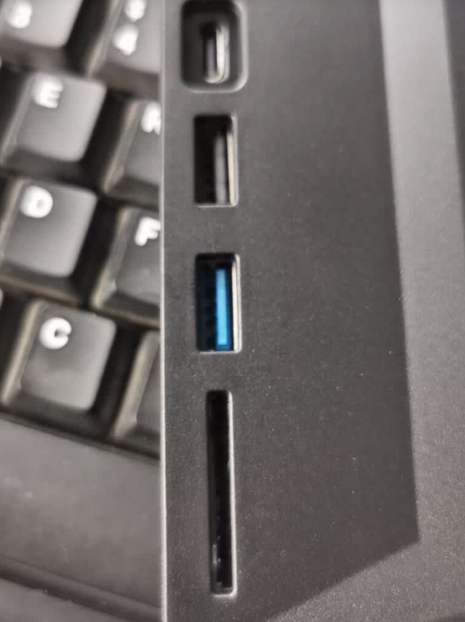
| Is enough power available? | Stable connection supports smoother use |

How To Use It Well
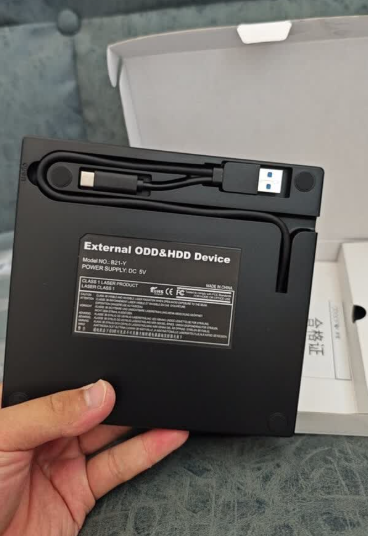
Place the drive on a flat, stable surface before inserting a disc. Connect it directly to a compatible computer port when possible, especially for tasks that need reliable power. Open the disc with the appropriate software for the format you are using. If you are burning a disc, avoid moving the drive while it writes, and keep other heavy tasks on the computer to a minimum until the process finishes.
Take a moment to inspect older discs before use. Dust, fingerprints, scratches, and warped cases can all make reading less reliable. Wipe discs with a safe method, store them properly, and avoid forcing the tray or moving the cable while the disc is spinning. Small habits help protect the files and the drive.
When the task is finished, put the drive back in the same place so it is easy to find next time. Keep the cable with it. If you use it for family archives, consider making a modern backup after you open the disc, so the files are not locked to one aging piece of media forever.
Keep A Disc Drive Ready
FAQ
Will it play Blu-ray movies automatically?
Can it burn discs?
Is it for 4K Ultra HD Blu-ray?
Where should I keep it?
A Practical Bridge Back To Physical Media
The Portable External DVD and Blu-Ray Drive is for the discs you still care about and the computer that no longer has a tray. It helps you read compatible media, manage older files, and keep a compact optical drive available without dedicating permanent desk space. If your home or office still has discs worth opening, this is a practical way to keep them within reach.
Bring Home The Portable Disc DriveCompatibility depends on disc type, computer hardware, operating system, software, and power conditions. Check your setup before use.